Key a withdrawal request (taking goods out)
The screenshots and data in these docs belong to a sample company (Sample Logistics Co., Ltd.); the depositors, items, documents and numbers are fictitious.
New withdrawal request
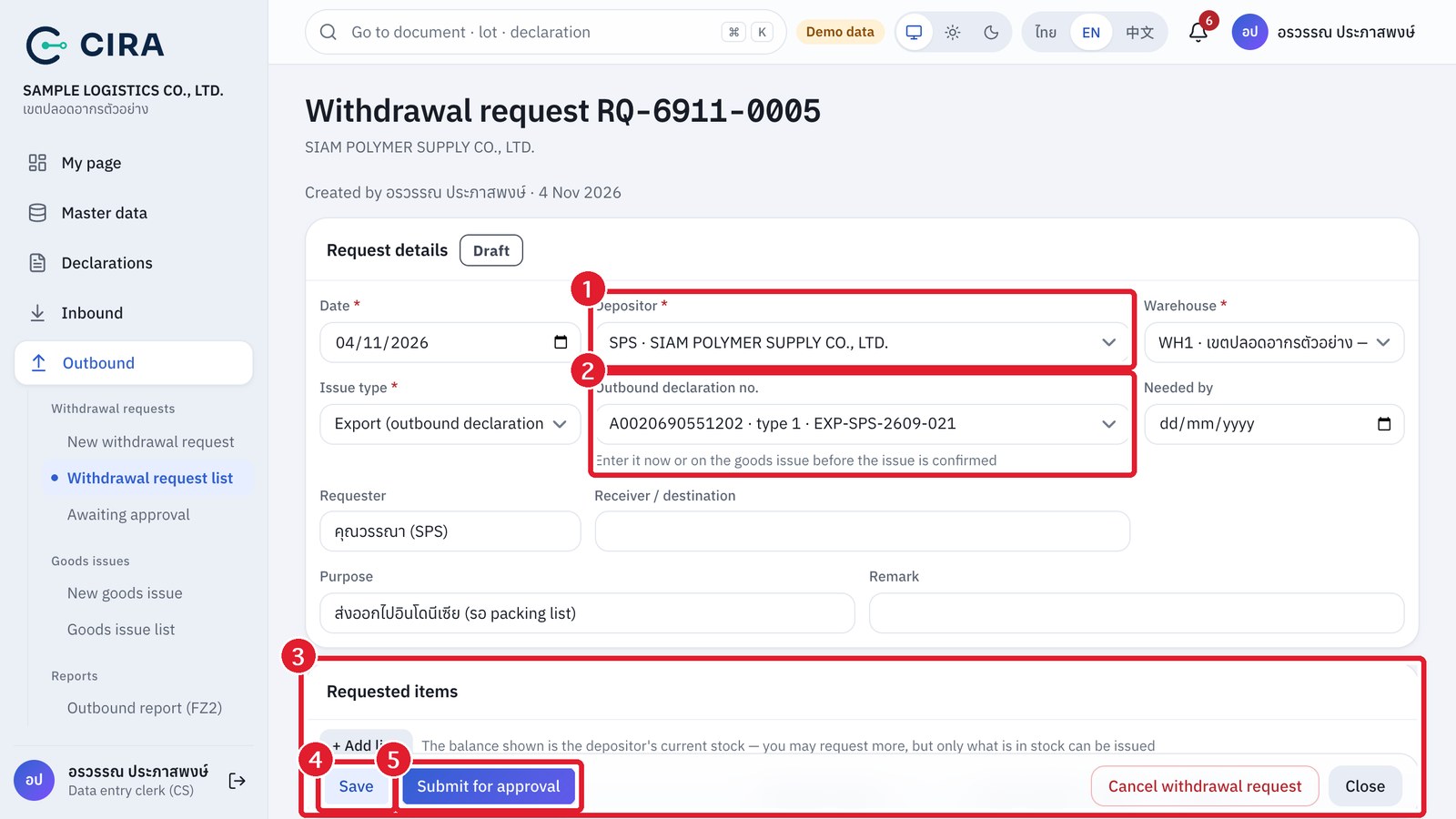
- Outbound › New withdrawal request → select the depositor, the Issue type (Export and Domestic transfer out = an outbound declaration is required: select it now, or enter it on the goods issue before the issue is confirmed; Return to depositor; Internal use / destruction), Needed by, Receiver / destination, Purpose.
- Lines: item + Qty requested (the system shows the depositor's balance for you).
- Save (F8) → Submit for approval → "Awaiting approval", waiting for the warehouse manager.
- If it is Returned: open the request, read the reason in the history line, make the corrections, then press Submit for approval again.
- If the customer withdraws the request: Cancel withdrawal request (with a reason). You can do this until issuing has started.