Production in the Free Zone (depositors who manufacture in the zone · keyed by CS or warehouse · confirmed by warehouse or manager)
The screenshots and data in these docs belong to a sample company (Sample Logistics Co., Ltd.); the depositors, items, documents and numbers are fictitious.
On this page
Use this when the Production module is on (section 4.3), for operators that manufacture in the zone. Operators that do not, such as commercial-type operators, turn this module off, so they see neither the Production menu nor the production reports group, and they can skip this section.
This matches the production module of the CTL system (BOM → job order → requisition → production receipt → WIP → RM/FG reports), and every movement still goes through the stock ledger and the system's usual rules (no negative balances, no edits after confirmation, full history).
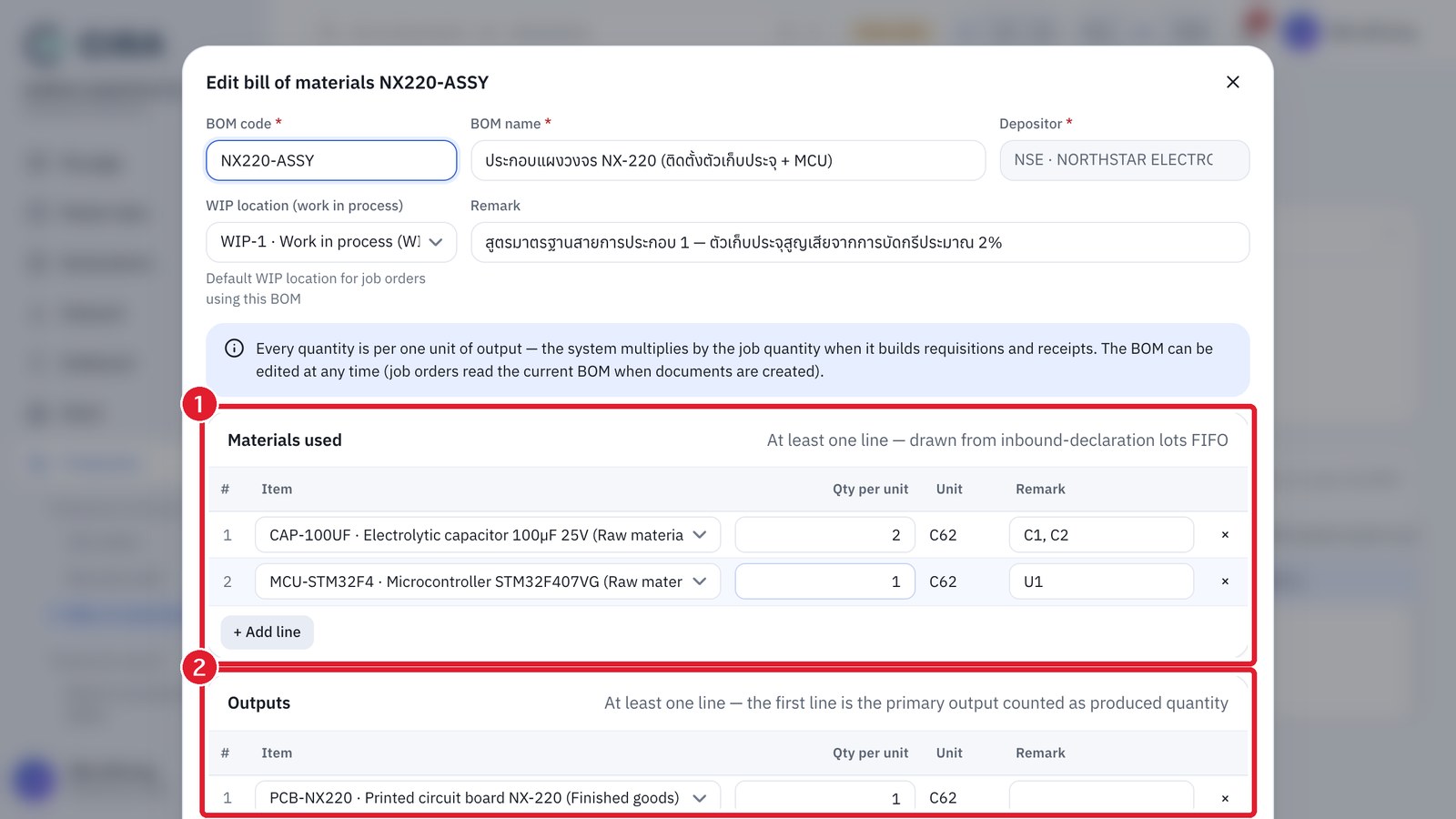
Prepare the master data: set the "Item type" of raw materials, finished goods and goods for destruction (Master data › Items), and create at least 1 storage location of type Work in process (WIP) (demo data: WIP-1) and an output location (FG-01). Create a BOM at Production › Bills of materials (BOM) by pressing Create (F2).
In this section
- 1Job ordersSection 9.1
- 2RequisitionSection 9.2
- 3Production receiptSection 9.3
- 4Production reportsSection 9.4
Training videos
Opens the CIRA training video page (Thai, English and Chinese, with subtitles)